KEY TAKEAWAYS
- Texting sends messages over cellular networks and can reach any phone without an app. Instant messaging (IM) runs over the internet and requires both people to use the same app.
- Instant messaging adds richer media and conversations that sync across devices, and many apps encrypt messages end-to-end, which standard texts don’t.
- Most Apple and Android mobile devices now support Rich Communication Services (RCS), blurring the line between IM and standard texting.
- With over 8 billion mobile devices worldwide, texting is the strongest first choice for business outreach. Textedly’s user-friendly SMS platform lets you send to your whole customer list at once.
A customer texts your business to confirm a reservation, and a few minutes later, another customer messages you on WhatsApp about the same time slot. Your phone displays both the same way.
Texting reaches any phone number, while instant messaging apps only work when both people have the same app installed. Businesses see that reach in the results, with texting campaigns averaging a 98% open rate and a 90-second response time.
To help you decide which channel fits your business texting strategy, we’re comparing SMS texting vs. instant messaging based on factors like cost and security. We’ll also cover how RCS and iMessage obscure the difference between the two.
What Is Texting?
Texting, or text messaging, sends short electronic messages between two or more mobile devices. One of the biggest advantages of texting is that all modern mobile networks and devices support it, and a standard text travels over a cellular signal. That means it works without Wi-Fi or mobile data.
Texting also works even if both people aren’t available at the same moment. One person can send a message, and the recipient can reply whenever they pick up their phone.
Advantages like that are thanks to the Short Message Service (SMS) technology that powers standard text messaging. Multimedia Messaging Service (MMS) is another form of text messaging that can include images, videos, and other content.
Either type of text starts the same way. To text your customers, you’ll need an active cellular network connection, a number to send from, and the phone numbers of the customers to send to. Before you send a marketing text, you also need their express written consent.
Once customers opt in, you can reach them on a device they already carry. With over 8 billion mobile devices worldwide, texting is an easy and helpful way of staying connected.
Here’s a look at how much people text:
- 88% of people primarily use their phones for texting.
- Americans exchanged nearly 2.2 trillion text messages in 2024.
- 60% of customers read texts within five minutes of receiving them, offering rapid communication and response.
- Over 3/4 of clients want businesses to send offers via SMS.
What Is Messaging?
Instant messaging (IM) allows you to send real-time messages through a software application. Facebook Messenger, WhatsApp, and WeChat are instant messaging apps that have steadily gained popularity.
One of the biggest advantages of instant messaging is that many services sync your message history across linked devices. You can pick up a conversation on your phone, tablet, or desktop as long as they all have the app of choice downloaded.
Some of them also let users make video and voice calls and share files.
Instant messaging applications are often called “over-the-top” (OTT) applications because they run on top of an internet connection instead of using a carrier’s texting service. To send and receive OTT messages, you need a device that connects to the internet, such as a smartphone or desktop.
You and the recipient also need the same app. WhatsApp alone has more than 3 billion monthly users, but you can only reach the people who use it too.
Instant Message vs. Text Message: Key Differences
Both channels can carry your business’s messages to customers, but the details behind each channel change what you can do. Here are the pros and cons of texting vs. instant messaging for business use, from how messages are delivered to how they’re secured.
Delivery Method
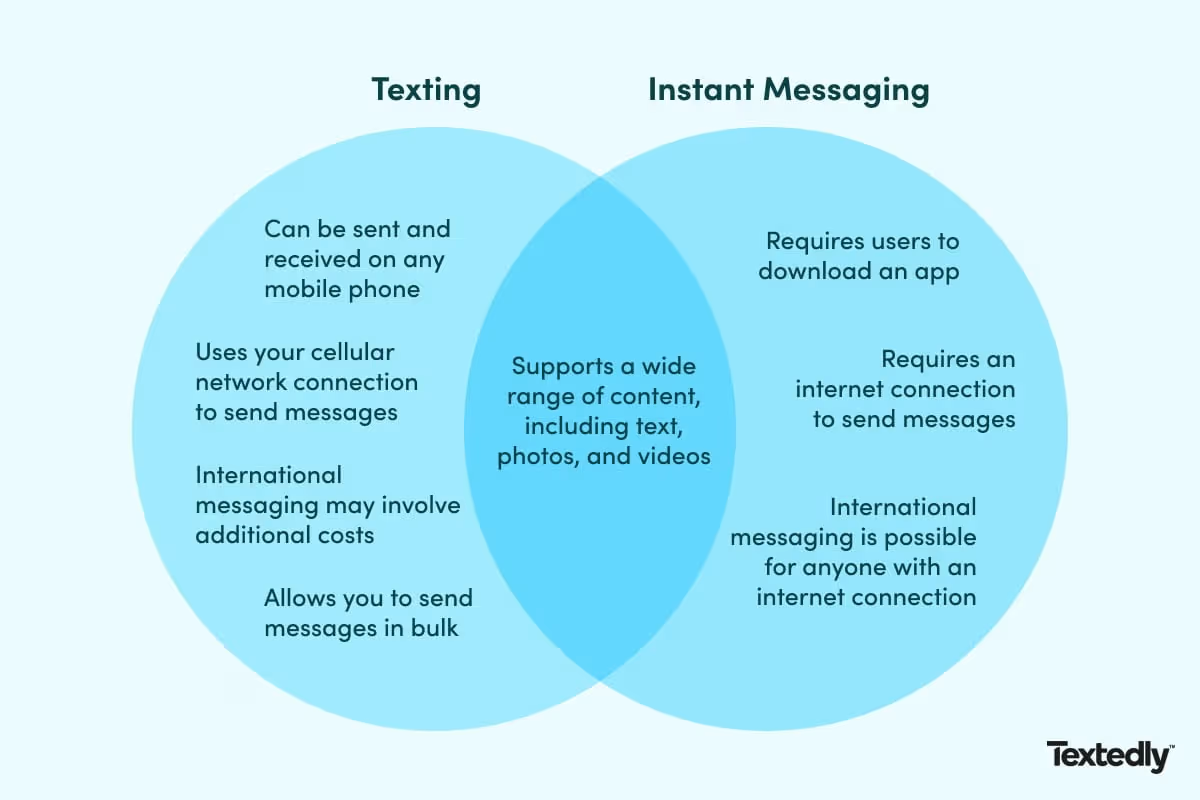
Texting: Messages can be sent and received on any cell phone, no matter the cellular carrier, eliminating the need for additional apps. A text needs only a cellular signal, so it still arrives when mobile data is slow or unavailable. That makes it the more reliable choice for time-sensitive messages to a broad customer list.
Instant Messaging: OTT campaigns require users to download an app to function. The sender and recipient have to use the same application to communicate. The upside is that Wi-Fi alone is enough, so messages can be sent in a building with no cell service. Choose it for ongoing conversations with customers who already use the app.
Devices
Texting: Texting is built into every mobile device, so you only need a cell phone to send text messages. That includes older flip phones and other basic phones, which makes texting the safer choice when your customers use a mix of devices. Standard texting stays tied to the phone, though, with nothing to carry a conversation to another device.
Instant Messaging: IM works on various devices (desktop, laptop, tablet, smartphone), and many apps sync your message history across linked devices. The limit is device support, as older phones may not support these apps.
International Capabilities
Texting: International messaging depends on your carrier plan and may involve additional costs. Rates vary widely by carrier and destination country, so check your plan before sending.
Instant Messaging: Instant messaging works worldwide for anyone with an internet connection, as long as the recipient has the same app installed. Once both people do, messaging across borders can cost little or nothing beyond data.
Speed
Texting: Most people read texts within five minutes of receiving them, offering rapid communication. That makes texting the better choice for time-sensitive messages, like appointment reminders or flash sales, where the goal is getting seen quickly. The tradeoff is visibility, since standard texts don’t show typing indicators or read receipts.
Instant Messaging: IMs require an internet connection, causing delays for customers without one. A message sent to an offline recipient waits until they reconnect. Once connected, typing indicators and read receipts show when someone has read your message and is replying, which is useful for live conversations.
Number
Texting: You can send bulk texts, from hundreds to thousands, simultaneously through application-to-person (A2P) messaging. Business platforms send these texts from carrier-registered numbers, which lets them go out in volume. Each recipient must first give consent for marketing texts. Texting is ideal for promotions and reminders that need to reach many people.
Instant Messaging: Instant messaging apps may support group chats and small broadcast lists, but don’t scale as texting does. Use IM groups for conversations with a small, known set of people.
Message Type
Texting: Texting supports SMS and MMS messages, allowing users to send text, photos, and videos. Carriers limit the size of MMS files, and larger ones may be compressed or rejected. That makes texting the right fit for short messages and simple images, like a promo photo or an order update.
Instant Messaging: Apps typically support a wider range of content, including voice memos, documents, and stickers, as well as voice and video calls. File limits are also looser than MMS, so larger photos and videos can be sent more easily. Use IM for conversations that need richer media or a live call.
Cost
Texting: Costs depend on your carrier’s texting plan, and delivery fees may apply to those without an unlimited plan. International texts can cost more. Business sends go out through a texting platform with its own pricing, so check the per-message rate before a large send.
Instant Messaging: Instant messaging is usually free after downloading OTT apps, apart from data charges when you’re off Wi-Fi. Businesses sending at scale may pay per message, depending on the app.
Character Limits
Texting: Most texts are limited to 160 characters, which keeps messages short and quick to read. Adding even one emoji cuts that to 70 characters per text, and longer messages get split into multiple parts. Textedly raises that limit, letting you send longer text messages of up to 1,600 characters so the full message goes out in one text.
Instant Messaging: Instant messages have virtually unlimited character counts, so a long message arrives as one. Use IM when a message needs room for detail.
Encryption & Security
Texting: Standard texts aren’t end-to-end encrypted, which means someone with access to the carrier’s network can intercept them. Appointment reminders and promotions work fine over text, but sensitive details like passwords or account numbers don’t belong in one.
Instant Messaging: Apps like Signal, WhatsApp, and iMessage encrypt every message by default, and WhatsApp and iMessage also encrypt conversations between people. Business messaging can work differently, since a company that messages customers lets that platform read the conversation. Use IM for private conversations, and ask any business provider where messages are stored.
Where Texting and Messaging Overlap
Texting and instant messaging are harder to tell apart than they used to be, and Rich Communication Services (RCS) is a big reason why. RCS adds read receipts and typing indicators to the native texting app, along with higher-quality photos and videos. It also sends messages over the internet using Wi-Fi or mobile data, rather than the carrier’s texting service.
RCS only works when everyone in the conversation has it. Each person needs a compatible phone and a carrier that supports it. If either is missing, the message falls back to SMS or MMS. End-to-end encryption for RCS is rolling out as well, but it applies only when every participant’s carrier supports encryption too.
iMessage, Apple’s instant messaging service built into the iPhone texting app, switches between channels in the same way. Messages between Apple devices travel over the internet and appear as blue bubbles. If the recipient isn’t on an Apple device, the message goes out as RCS or a regular text, and the bubble is green instead.
Android’s Google Messages app switches similarly, labeling each message “RCS message” or “Text message.” RCS doesn’t replace SMS, so a text marketing platform like Textedly still reaches customers on RCS-capable phones.
Which Should You Use for Your Business?
Texting is the preferred first choice for most business outreach, since it reaches nearly any phone without requiring customers to download an app. Instant messaging earns its place in one-to-one conversations that need rich media or a back-and-forth.
Ask these questions when deciding which fits your business:
- Does your business need time-sensitive mass outreach? Texting fits best. One send can reach a whole customer list, so appointment reminders and flash sales get out quickly.
- Do you need to reach customers regardless of device? Texting is better because standard texting is native to the phone, so customers don’t have to download anything to receive it.
- Do you support customers one-to-one with rich media? Instant messaging is the better option. Voice memos, file sharing, and calls inside the chat make longer conversations easier.
- Do conversations include sensitive details? An instant messenger that supports end-to-end encryption is best for protecting your customers.
Start Texting Customers With Textedly
A customer doesn’t need to install an app to read your text. That’s the case for businesses choosing texting first, since it reaches the widest audience with the least effort on your customers’ part.
Textedly makes it simple to put that into practice with user-friendly SMS solutions. Two-way conversations let you text and respond to your entire customer list all in one place. Create your free account with no credit card required and send your first message today.
Related resources:
- What is SMS and Is It Different From a Text?
- What Does “Sent As a Text Message” Mean?
- RCS Messaging: What Is It and How Does It Work?
- RCS vs. SMS: Key Differences & Which to Choose
Instant Messaging vs. Texting FAQ
Are messaging and texting the same thing?
Not exactly. Texting sends messages over a cellular network and works on any phone. Instant messaging uses an app and an internet connection, and both people need the same app. People often use the two terms interchangeably, and features like RCS and iMessage blur the boundary between them.
Do I need the internet to send a text message?
No. A standard text message travels over your carrier’s cellular network, so it can be sent without Wi-Fi or mobile data. Picture messages (MMS) use mobile data, and RCS and iMessage use Wi-Fi or mobile data, so those need a connection. Instant messaging apps always need one.
Is texting more secure than instant messaging apps?
Not for standard texts. SMS and MMS messages aren’t end-to-end encrypted, while apps like Signal and WhatsApp encrypt conversations between people. RCS texts can also be end-to-end encrypted, but only when every participant’s carrier supports encryption. Sensitive details should not be included in a standard text.
Why do people call instant messaging “texting”?
“Texting” is often used casually to refer to any quick message from your phone, so people use it for app messages too. Phones add to the confusion, since the iPhone’s Messages app sends iMessages and regular texts from the same screen. Technically, texting means SMS and MMS over a cellular network.
Related Articles

AI Voice Agents vs. IVR: Best Answering Service?

What is A2P Messaging? Your Ultimate Explainer
.webp)
Textedly vs. Messente: Which SMS Platform is Right for You?

27 Tone Indicators and How to Use Them


Your Customers Are Waiting
Send your first text in minutes—no contracts, no credit card, no hassle.