What Is SMS and Is It Different From a Text?
All SMS messages are texts, but not all texts are SMS — understand the differences between SMS, MMS, and instant messaging and how each fits business outreach.
KEY TAKEAWAYS
- SMS and text are often used interchangeably, but SMS travels over cellular networks while broader text includes apps like iMessage and WhatsApp.
- SMS caps at 160 characters of text only, while MMS supports images, video, and audio for richer multimedia communication between devices.
- Behind every SMS, an SMSC server routes, stores, and delivers the binary-encoded message across mobile networks before the recipient receives it.
- With a 98% open rate versus email's 16.9%, Textedly's SMS platform delivers promotions, order updates, and appointment reminders reliably at scale.
- SMS works especially well for time-sensitive messages like appointment reminders, and Textedly's appointment reminder texts help businesses confirm bookings and keep customers on schedule.
If you’re new to marketing or unfamiliar with text message lingo, the term “SMS” may raise questions. SMS is just one way to send a text, and it works differently from instant messaging and multimedia messaging in ways that affect what your messages can include and who they reach.
For businesses, knowing those differences makes it easier to choose the right channel for each message, whether that’s a quick appointment reminder or a promotion with a product photo.
In this article, we’ll cover all the basics of SMS, debunk the common misconceptions about SMS vs. text messaging, and share how businesses can use this versatile communication platform to their advantage.
The Difference Between an SMS vs. Text
SMS is a specific type of text message sent over a carrier’s cellular network, while “text” is a broader term that also covers messages sent through internet-based apps like iMessage and WhatsApp. So, while all SMS messages are texts, not all texts are SMS messages.
People often use the two terms interchangeably because most of these messages look alike on screen, even though they travel in different ways.
For businesses, the SMS vs. text message difference comes down to reach. SMS works on virtually any mobile phone without an app or internet connection, which makes it the most dependable way to reach an entire customer list. App-based messages, by contrast, only reach people who use the same app.
iMessage vs. SMS: Why Some Texts Look Different
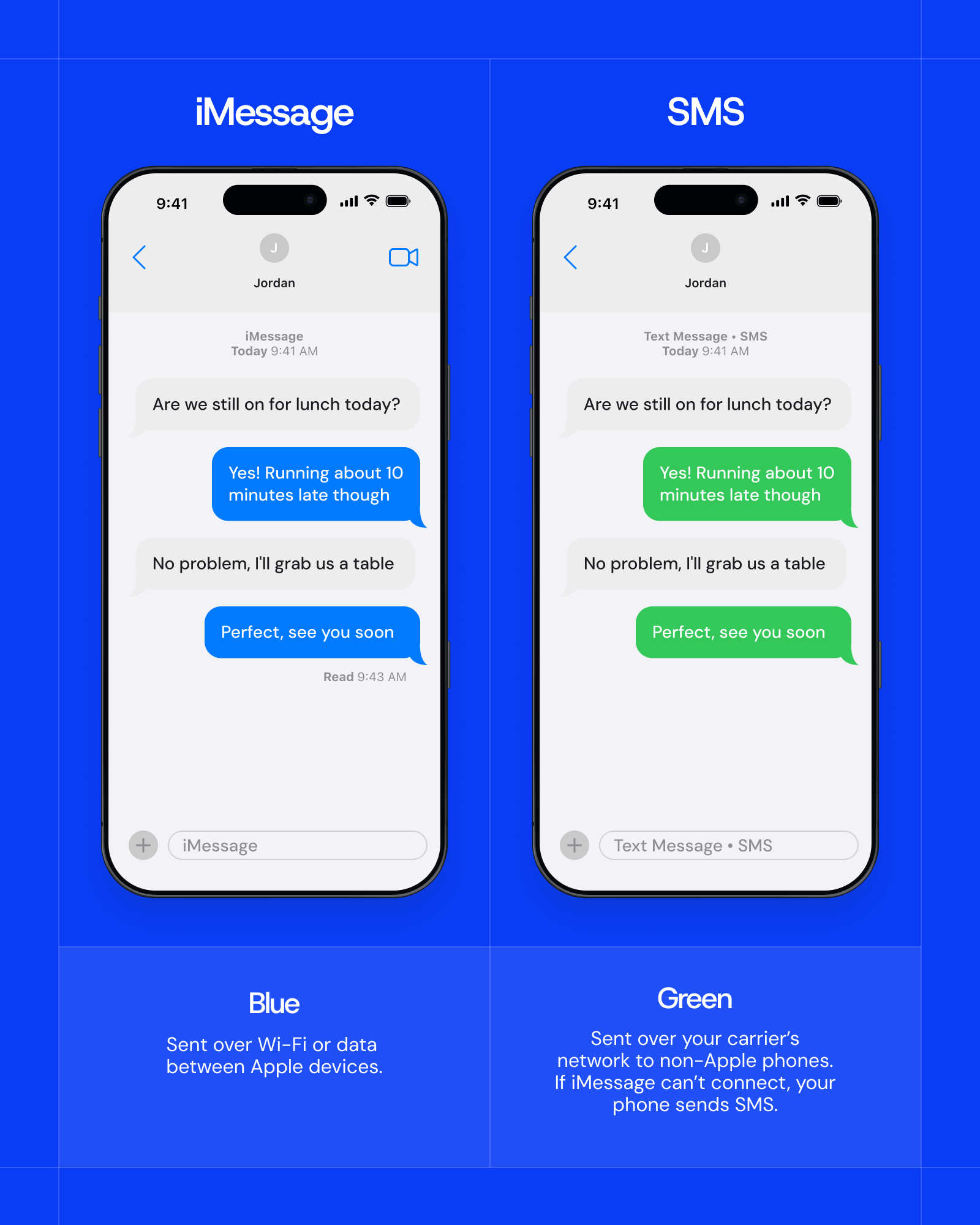
On an iPhone, texts look different because of how they’re sent: blue bubbles mean the message went through iMessage, while green bubbles mean it was sent as SMS or RCS. Rich Communication Services (RCS) is a newer messaging standard that upgrades SMS with features like read receipts and high-quality photos, using Wi-Fi or mobile data instead of the carrier’s SMS network.
Your phone picks the format automatically based on who you’re texting and how you’re connected. Messages between two iPhones go through iMessage, as long as both people have iMessage turned on and a data or Wi-Fi connection. Messages between an iPhone and an Android phone can use RCS, which Apple added in iOS 18, if the iPhone user’s carrier supports it. When neither option is available, the phone falls back to SMS, and the conversation becomes a standard SMS chat.
What Is SMS?
Short Message Service, or SMS, is a text messaging service that allows the exchange of short text-only messages of up to 160 characters. Because these messages can be sent and received on various mobile networks, it’s a quick, convenient way to send concise messages to individuals or groups.
While it’s often used for small talk or short, personal conversations, it’s also utilized by businesses for both internal and external communication. Over the years, it has become an essential component of mobile communication—one that many of us would have trouble living without.
How SMS Works
Although there’s a simple definition, a lot goes on behind the scenes to make it possible. Here’s a simplified breakdown of how it works:
- Initialization. The process begins when a user composes a text message on their mobile device and selects a recipient. The message is then converted into binary code.
- Sending request. The sender's device transmits the message to the nearest cell tower, which relays it to the carrier's Short Message Service Center (SMSC), a server responsible for handling text messages.
- SMSC processing. The SMSC stores the message and looks up the recipient's phone number to find which network serves them and whether their phone is reachable. If the phone is off or out of coverage, the SMSC holds the message and retries delivery later.
- Routing. The SMSC determines the most efficient message delivery channel to the recipient’s mobile network.
- Delivery attempt. The message is transmitted to the recipient’s mobile device through the selected route. If the recipient is unavailable, the SMSC attempts redelivery.
- Recipient’s SMSC. Upon successful delivery to the recipient’s mobile network, the recipient’s SMSC takes over, forwarding the message to the recipient’s device.
- Message display. The recipient’s device receives and decodes the binary message, displaying a readable text on the screen.
- Acknowledgment. The recipient's phone confirms receipt to the network, and the SMSC can send a delivery report back to the sender if one was requested.
- Storage and deletion. The message may be stored on both the sender’s and recipient’s device, depending on user settings. It may also be deleted according to device memory constraints or user actions.
- Billing and logging. The mobile carriers log the SMS activity for billing purposes, and users may access message logs on their devices.
SMS as a Business Communication Tool
The SMS vs. text distinction matters for businesses because SMS is what they’re actually sending.
Business texting platforms typically deliver messages as SMS (or MMS for images) rather than through apps like iMessage or WhatsApp, so customers can receive them on any mobile phone without downloading anything.
That makes SMS one of the most direct ways to reach customers, whether you’re sending a one-off update or running ongoing text marketing campaigns.
The format also shapes how businesses write. SMS’s 160-character limit favors short, direct messages, which is why business texts tend to be easy to act on. A business may send out a text message to customers that contains information such as:
- Sales, discounts, or promotions
- Order delivery notifications or status updates
- Appointment reminders and confirmations
- Account notifications
But why use SMS over other modes of communication? Research shows that 98% of all SMS messages are opened by the recipient. This makes it an attractive marketing channel for businesses, as only 16.9% of email messages are opened, and customers no longer prefer speaking with businesses over the phone.
SMS vs. Instant Messaging
Instant messages are among the most common types of text besides SMS. Instant messengers like WhatsApp and Facebook Messenger let you send real-time messages through a software application. They're often called "over-the-top" (OTT) applications because they run over an internet connection, using Wi-Fi or mobile data instead of the carrier's SMS network.
SMS vs. MMS
SMS is limited to text, while MMS, which stands for Multimedia Messaging Service, lets users send and receive media files like photos and videos alongside text. Here's how SMS, instant messaging, and MMS compare side by side:
When to Use MMS for Business
MMS is worth using when a visual will do more work than words alone. A clothing boutique can text a photo of new arrivals, letting customers see the products before they visit. An event venue can send its flyer as an image so the date, time, and details all arrive in one place.
Coupons also land better with a visual, especially when customers need to show the offer at checkout. GIFs bring personality to holiday greetings or flash-sale announcements, helping a brand's messages stand out in a crowded inbox.
Because MMS typically costs more to send than SMS, it makes sense to save it for messages where the image matters. With Textedly's picture messaging, businesses can attach photos and GIFs to their campaigns, then switch back to plain SMS for routine updates like reminders and confirmations.
Get Powerful SMS Campaigns Up and Running With Textedly
SMS gives businesses a fast, dependable way to reach customers on any phone, and Textedly helps you do it with confidence. Our team guides you through number registration and consent requirements, so your messages reach customers instead of getting filtered by carriers. From there, you can send transactional SMS like order updates and appointment reminders, or use AI agents to answer incoming questions and follow up with customers in real time.
Create your Textedly account (no credit card required) and start sending compliant SMS messages in minutes.
FAQs
Is SMS the same as a text message?
SMS is one type of text message, but not every text message is SMS. The term “text" also covers messages sent through apps like iMessage and WhatsApp, which use an internet connection instead of the carrier's SMS network.
Why do my texts send as SMS instead of iMessage?
Your iPhone sends a text as an SMS when it can't deliver it via iMessage, which usually happens when the recipient doesn't use an Apple device or when one of you has no Wi-Fi or cellular data connection. If the recipient has an Android phone, you may use RCS instead, as long as your carrier supports it.
Can businesses send SMS to iPhone and Android users?
Yes, businesses can send SMS to both iPhone and Android users, since SMS runs on the carrier network and works on virtually any mobile phone. Before texting customers for marketing purposes, businesses need their consent, which is usually obtained through an opt-in, such as a keyword or a web form.
Related Articles

Textedly vs. Klaviyo SMS: Which SMS Platform is Right for You?

Texting in Healthcare: Tips and Templates

RCS Messaging: What Is It and How Does It Work?

The Difference Between Shared and Dedicated Mobile Numbers

Your Customers Are Waiting
Send your first text in minutes—no contracts, no credit card, no hassle.