What Is a Text Message API? How It Works & When You Need One
A text message API connects your software to SMS, automates business messaging, and supports customer communication. Learn more and see how Textedly can help.

KEY TAKEAWAYS
- A text message API connects your business software to a messaging provider, allowing applications to send and receive SMS automatically.
- Text message APIs automate delivery by passing requests to a provider, which routes messages to recipients and returns delivery updates or incoming replies.
- You can use text message APIs for diverse business needs, from sending verification codes and appointment reminders to sharing order updates and running marketing campaigns.
- Choose an API based on your needs. Prioritize two-way messaging, delivery reporting, suitable sending capacity, compliance tools, and clear developer documentation.
- Textedly helps you manage SMS campaigns with automated drip campaigns, two-way messaging, and built-in compliance tools. With SMS open rates reaching 98%, text messaging also gives you a strong channel for reaching customers.
Your booking system already knows when every appointment is scheduled, but someone on your team still sends reminders by hand. Each new booking adds another task to the list, and a missed reminder can mean a missed appointment.
A text message application programming interface (API) can connect your booking system to your messaging service, so appointment updates reach customers automatically. The same connection can confirm orders, follow up with leads, and keep customers informed without adding manual work to your team’s day.
Learn more about text message APIs, including how they work and when your business needs one. You'll also discover how SMS gateways fit into the picture.
What Is a Text Message API?
A text message API lets software send and receive text messages automatically through a messaging provider. You can connect the API to your booking systems, CRM software, or websites to trigger messages based on specific actions.
To understand a text message API better, think of it as a restaurant’s order system. When a customer orders a burger, the system sends the order to the kitchen without a server having to relay it by hand.
Similarly, an API passes a message request to a messaging provider, which sends the text to the recipient’s phone. Messages sent this way are called application-to-person (A2P) messages because the software sends them to people.
How Does a Text Message API Work?
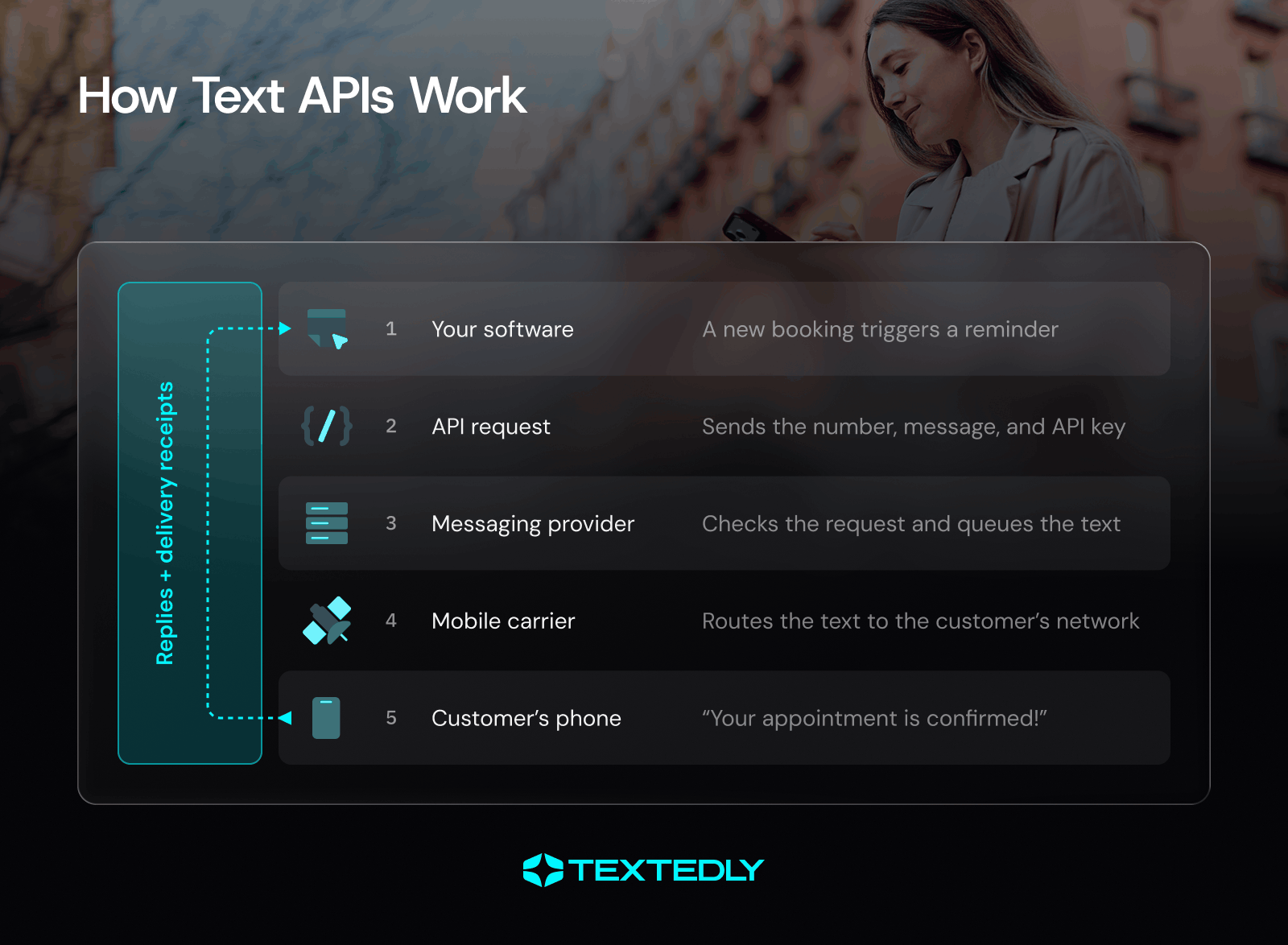
When an event triggers a message, the API sends a request to your messaging provider, which routes the message through a mobile carrier to the recipient’s phone. The API can also receive replies and delivery updates, enabling two-way conversations and message tracking.
Sending a Text Through an API
A send request tells your messaging provider where to send a message and what it should say. Most APIs use a Representational State Transfer (REST) request with JavaScript Object Notation (JSON) data.
Here’s how the process works:
- Trigger the message: A customer books an appointment or completes another action in your system.
- Send the request: Your software submits the recipient’s phone number in E.164 format, the sending number, the message body, and authentication credentials.
- Validate the request: The provider verifies your credentials and message details before adding the message to its sending queue.
- Route the message: Your messaging provider sends the message through an SMS gateway or aggregator to the recipient’s mobile carrier.
- Deliver the text: The carrier routes the message to the recipient’s phone.
Here’s an example of an API request:
POST /v1/messages
Authorization: Bearer YOUR_API_KEY
Content-Type: application/json
{
  "to": "+14155550123",
  "from": "+14155550456",
  "body": "Your appointment is confirmed!"
}
Receiving Replies With Webhooks
A webhook sends an automatic notification to your messaging software when an event occurs. As soon as a customer replies to a text, the messaging provider sends the reply to a URL configured in your system.
Your software can then display the response or trigger a follow-up action. This setup supports two-way conversations without requiring your team to monitor every message manually.
Tracking Delivery Receipts
Delivery receipts (DLRs) report the status of a text message. Depending on the provider, statuses may include queued, sent, delivered, or failed. The system you choose can use these updates to identify failed messages and investigate delivery issues.
If you use a receive SMS API to handle incoming messages, you can also process customer replies within your own software. Combining inbound messages with delivery updates gives you a clearer view of message activity.
Message Length and Segments
A standard SMS segment supports up to 160 characters with GSM-7 encoding. Messages containing Unicode characters, including many emojis, typically support 70 characters per segment. Longer messages split into multiple segments, which can increase messaging costs.
Textedly supports long SMS messages of up to 1,600 characters. This gives you more room to share detailed information in a single message.
What Can You Do With a Text Message API?
A text message service API lets you send timely messages based on customer actions. Here are six ways to use it across industries like retail, restaurants, healthcare practices, real estate, and gyms:
Do You Need a Text Message API? API vs. SMS Platform
A text message API is a good fit if you have developers who can build texting into your own software or you need to send messages at high volumes. An SMS platform is usually the better choice if you want to send messages without writing code or managing the technical setup.
With an SMS message API, you get more control over how texting works within your applications. You can add one-time passcodes to your login flow, send automated messages from your software, or build custom messaging workflows. However, your team will need to handle the integration and decide how to manage SMS compliance.
An SMS platform handles much of that work for you. It’s a practical option for marketing campaigns, shared team inboxes, and ready-to-use text message templates. You can manage campaigns and customer conversations through a central dashboard without needing developer resources.
Features To Look For in a Text Message API
Choose a text message API that fits your messaging needs and can grow with your business. These features will help you compare providers and find the right fit:
- Two-way messaging and MMS support: Check that you can send texts, receive replies, and send images or other media if needed.
- Delivery reporting: Delivery reports help you spot failed messages and monitor sending performance.
- Number options and throughput: Make sure the provider supports your target markets and expected message volume.
- Built-in compliance tools: Look for features that support consent management, opt-outs, and required number registration. Textedly, for example, offers support for TCPA compliance and features like 10-digit long code (10DLC) business texting.
- Developer resources: Clear documentation and code examples help your team integrate the API and resolve issues.
- Reliability, support, and pricing transparency: Check uptime commitments, support availability, and potential extra fees before choosing a provider.
Text Message API Compliance: Registration and Consent Rules
B2B texting is legal in the U.S., as long as your messages comply with applicable federal and state laws. Before sending business texts through an API, make sure your setup meets the relevant registration and consent requirements. The following three areas deserve particular attention.
Note: This section is for informational purposes only and isn’t legal advice.
Register Your Business Before You Send
If you use U.S. 10DLC numbers for business texting, you’ll need to register your brand and messaging campaign through The Campaign Registry (TCR), with help from your messaging provider. Registration helps carriers identify your business and review your messaging use case.
Get Consent Before You Text
The Telephone Consumer Protection Act (TCPA) requires prior express consent for covered informational texts and prior express written consent for covered marketing texts. A customer providing their number for appointment updates doesn’t automatically give you permission to send promotional offers. So consent is key.
Build the Required Mechanics Into Each Message
Clearly identify your business and provide a way for recipients to opt out, such as replying STOP, with a process to honor those requests. Set up HELP responses where supported, and follow applicable texting-hour restrictions, including stricter state rules where they apply.
Automate Your SMS Campaigns With Textedly
Good customer communication takes timing, but remembering to follow up with every lead or welcome every new subscriber can quickly fill your calendar.
Textedly’s SMS drip campaigns let you schedule a sequence of messages that go out automatically after someone subscribes to your list. Set up your messages in advance, choose when each one should go out, and that’s all. Textedly will handle the follow-ups and all, while you focus on growing your business.
Try Textedly today. Sign up in seconds and start sending messages that actually get read.
Text Message API FAQ
What Is an SMS API, and How Does It Differ From an SMS SDK?
An SMS API lets your software communicate with a messaging service to send or receive texts. A software development kit (SDK) is a collection of code libraries and tools that makes it easier to use that API in a particular programming language. You can often call an API directly or use the provider’s SDK to simplify integration.
Can I Use My Android Phone as an SMS Gateway?
Yes, you can use your Android phone as an SMS gateway with an app that exposes its messaging capabilities through an API. This setup sends texts through your phone’s SIM and mobile plan, so sending capacity depends on your carrier and device availability.
Can a Text Message API Send Bulk Texts?
Yes, a text message API can send bulk texts to many recipients, either through individual requests or a provider’s bulk messaging features. Sending limits, throughput, and registration requirements depend on the provider you choose and the destination country.
What Programming Languages Work With a Text Message API?
Most programming languages that can make HTTP requests can work with a text message API, including Python, JavaScript, Java, and PHP. Some providers also offer SDKs that make integration easier.
Does a Text Message API Work Internationally?
Yes, many providers support international SMS, but destination coverage, pricing, sender ID requirements, and delivery rules vary by country. Check your provider’s coverage and local requirements before sending messages abroad.

Related Articles

7 Ways to Overcome Lazy Cart Syndrome With SMS Remarketing

AI Voice Agents vs. IVR: Best Answering Service?

SMS Marketing Strategy: 7 Tips for Gyms and Fitness Clubs

How to Use B2B Texting to Boost Sales and Communication


Your Customers Are Waiting
Send your first text in minutes—no contracts, no credit card, no hassle.