SMS Customer Support: Examples, Best Practices & Platforms
Explore SMS customer support examples, keywords, best practices, and platforms to help your business manage two-way conversations and resolve customer issues.

KEY TAKEAWAYS
- SMS customer support gives customers a fast, low-friction way to get answers without waiting on hold or watching an inbox.
- Effective SMS support pairs automation with fast handoffs to real people, so look for a platform with strong routing, integrations, and compliance support.
- SMS works especially well for order updates, appointment changes, basic troubleshooting, after-hours questions, and other short, time-sensitive requests.
- Top SMS customer support platforms include Textedly, Textline, SimpleTexting, Zendesk, and Heymarket, with Textedly standing out for including AI agents, every feature, and 10DLC registration support on every plan.
Choosing the right customer support channel is tricky for business owners. Phone calls tie up your team, and emails can sit unread for hours (if not days). With SMS customer support, customers can reschedule an appointment or check on an order in a quick text exchange, without waiting on hold or digging through an inbox.
Below, you'll find the benefits of SMS for customer support, real-world message examples, and a comparison of the top platforms.
Is SMS Customer Support Faster Than Email and Phone?
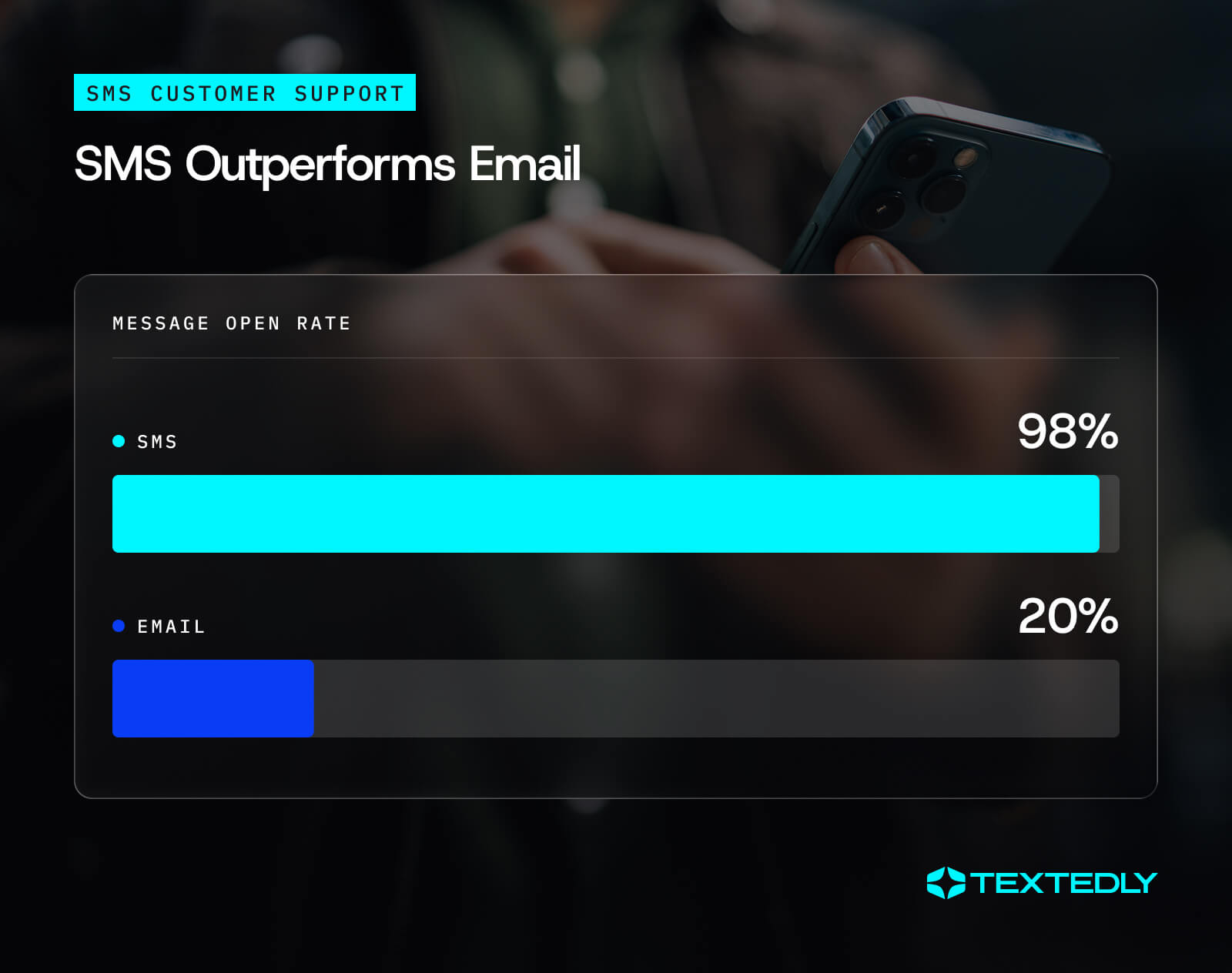
SMS customer support can often help you resolve customer issues faster than with emails, simply because users are more engaged with that channel. Generally, text messages have a 98% open rate (compared to 20% for email).
Because texts are short and asynchronous, customers can send a question, go back to their day, and read the answer whenever it arrives. The convenience makes SMS messaging more of an option for users who don't have time to wait through a long conversation.
Customers also skip the spam folder and the hold music. On the business side, one SMS support agent can handle several text conversations at once, which isn't possible on a phone call. That speed is a big part of why many customers prefer SMS over a phone call.
Common SMS Customer Support Keywords
SMS customer support keywords are short words customers text to a business number to request help or trigger an automatic reply. Unlike SEO search terms, these words act as commands inside the conversation itself.
A few keywords are standard across the industry. CTIA's messaging best practices call for STOP as the standard opt-out word and say that businesses also honor common alternatives like END, CANCEL, UNSUBSCRIBE, and QUIT. The table below shows common support keywords, what each one does, and whether it's required.
Other keywords, like SUPPORT or HOURS, are custom keywords a business sets up to answer common questions automatically. Most SMS platforms support these, and Textedly includes custom keywords on every plan, so you can send instant auto-replies, collect opt-ins, and track which campaigns bring customers in.
Customers won't always use a keyword, though (and they don’t have to). Because people tend to type how they talk, many users will ask a full question with common phrasing like "What time do you close today?"
Textedly's conversational AI agents can interpret those requests and reply with approved answers, so customers don't need to search through a glossary or memorize commands.
Benefits of SMS Customer Support
Good customer support shouldn't require customers to rearrange their day just to get an answer. SMS gives businesses that flexibility and makes support easier to manage without sacrificing the customer experience.
Help Customers Without Keeping Them on Hold
SMS lets customers ask for help without waiting on hold or staying on a live chat window. For your team, that flexibility means agents can work through messages by priority instead of juggling live calls, so fewer requests get missed.
Reduce Repetitive Support Work
Templates and automated replies take care of the questions support teams answer over and over, like store hours and shipping times. With SMS customer service templates, agents can send a saved reply in seconds instead of typing the same answer again, leaving more time for requests that need a personal touch.
Resolve Questions Before They Become Repeat Contacts
Proactive texts answer questions before customers think to ask them. For example, a text confirming a rescheduled appointment or sharing a delivery update removes the uncertainty that might lead customers to call, email, or text about the same issue. Teams can also track repeat-contact rates before and after launching SMS support to measure the impact.
Extend Support Beyond Business Hours
SMS makes it easy to support customers after business hours, since questions don't stop when the office closes. Responses can range from a simple acknowledgment to a full answer. While a basic auto-reply tells customers when the team will be back, Textedly's AI voice and SMS agents go further.
The agents can answer supported questions 24/7 by using the business's own help content and moving anything too complex to staff the next morning.
SMS Customer Support Best Practices
If you're figuring out how to use SMS for customer support, start by pairing automation with human interaction and letting each handle what it does best. For a step-by-step walkthrough, see how to set up SMS customer service.
Use Automation for the First Touch
Use automation as your front line so human agents can focus on the messy stuff. An instant automated reply lets customers know their message arrived.
A simple response like "We got your message! A team member will reply within 15 minutes." keeps customers from abandoning the thread or sending the same question through email and phone, too.
Keyword auto-replies can resolve the simplest questions without having to deploy human agents. For example, a customer who texts HOURS gets today's hours back, and a customer who texts STATUS gets a link to track their order.
Prioritize and Route Messages by Topic
Routing messages by topic gets each text to someone who can solve the problem. Skills-based routing tags incoming texts with topics like technical support, billing, or logistics, then sends customers directly to the team best equipped to help.
Textedly's omnichannel inbox, for example, can route inbound sales and support conversations to the right team. Customers spend less time being passed around, and agents can see the full conversation history, plus private sticky notes from teammates, before they reply.
Routing also makes it easier to prioritize. When SMS support connects to CRM data, priority queuing can automatically move urgent requests or messages from high-tier accounts to the front of the line, so teams can handle what needs attention now without losing track of everyone else.
Balance Automation With Human Replies
Automation works best when the answer is simple and the next step is obvious.
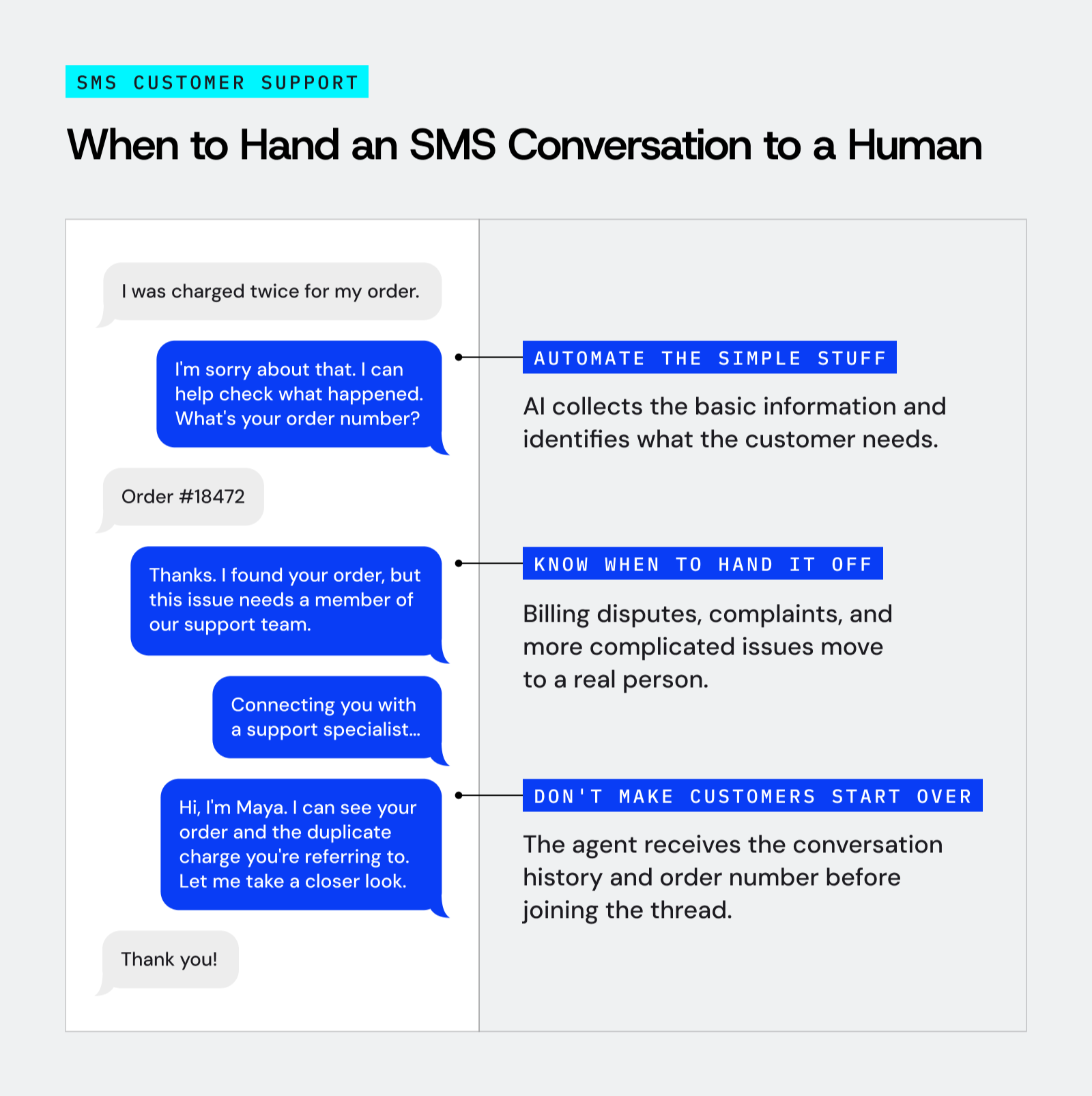
Bots can acknowledge the first message, share business hours, answer straightforward FAQs, or figure out where a question needs to go. Speed simply matters more than a personal touch in those interactions. Automating them frees up support teams for conversations that need their attention.
The trouble starts when automation doesn't know when to get out of the way. An upset customer shouldn't have to spar with a chatbot before reaching a real person. Effective SMS support sets clear escalation triggers that get those conversations to a human sooner, before frustration turns one problem into two.
Otherwise, the customer spends five minutes explaining the issue to a bot, only to repeat the whole process when an agent finally steps in. Neither the customer nor your team saves any time that way. Textedly's AI voice and SMS agents are built for this balance, answering routine questions instantly and handing more complex requests to a real person.
Set and Communicate Your Support Hours
Clear support hours set expectations before a customer ever sends a text. Customers don't expect a reply late at night, but they'll want to know when one is coming, so make your SMS support hours easy to find in places like:
- Your website header
- SMS opt-in disclosures
- Automated welcome messages
That small bit of clarity prevents unnecessary frustration, cuts down on repeat messages, and protects your reputation for responsive service.
After hours, you don't want to leave customers staring at a delivered message and wondering what happens next. An automatic response should tell them exactly when your team will be back and give them another option in the meantime.
Something as simple as “Thanks for reaching out. Our support team is offline for the evening and will be back at 8 a.m. tomorrow. You may be able to find what you need sooner in our Help Center: [link]” sets a clear expectation without pretending someone is available when they're not.
Track Response Time Metrics and Adjust
Tracking a few key metrics shows how well your SMS support is working and where to adjust. First response time (FRT) tells you how long customers wait to hear back, though the number can be misleading. An automated “We got your message” might look great on a report, but it doesn't mean much if a customer waits another hour for a real answer.
Track automated and human responses separately so you get a more honest picture of how quickly your team is responding.
Average handle time (AHT) measures how long it takes to get from the first message to an actual resolution, which can help uncover where conversations get stuck. Customer feedback matters, too.
A simple one-question CSAT survey sent by text right after the conversation ends can tell you a lot while the interaction is still fresh in their mind.
6 SMS Customer Support Use Cases With Examples
SMS support can handle a surprising amount of the everyday back-and-forth between customers and businesses.
The key is keeping each conversation useful: answer the question, make the next step obvious, and avoid turning a simple text into a five-paragraph explanation.
Here are six examples of what that can look like in practice.
1. Order and Delivery Questions
A delayed package is frustrating enough without having to hunt down an answer. A retailer can use SMS to quickly share what they know and what happens next.
Customer: “Hi, my order was supposed to arrive yesterday. Is there an update?”
Retailer: “Absolutely. Order [ORDER NUMBER] is still in transit and is now expected by [DATE]. You can follow the latest tracking updates here: [SECURE LINK].”
Order updates work best when the business has verified shipping information and can give the customer a clear next step.
2. Appointment Changes
Rescheduling should never require a lengthy phone call and ten minutes of hold music. Dental offices, salons, medical practices, and other appointment-based businesses can handle the entire exchange by text.
Customer: “Can I move my 9 a.m. appointment tomorrow?”
Dental Office: “Sure. We have openings at 11:30 a.m. and 2 p.m. Which works better?”
Customer: “2 p.m., please.”
Dental Office: “You're all set for 2 p.m. tomorrow.”
Text-based scheduling works best when staff can see real-time availability and confirm the change immediately.
3. Returns and Exchanges
SMS can also take some of the guesswork out of returns without asking customers to share sensitive information over text.
Customer: “Can I exchange something I ordered online?”
Retailer: “Yes. Eligible items can be exchanged within [RETURN WINDOW]. You can check your order and start the exchange securely here: [SECURE LINK].”
For returns, SMS works best when it explains the policy and directs account-specific steps to a secure page.
4. Basic Troubleshooting
For common problems with a known fix, just one clear instruction is all a customer needs.
Customer: “My router is connected, but I don't have internet.”
Internet Provider: “Let's try a quick restart. Unplug your router for 30 seconds, plug it back in, and give it about two minutes to reconnect. Did that get you back online?”
Use this approach for simple, low-risk troubleshooting with established support steps. If the fix doesn't work, the conversation can move to a live agent.
5. After-Hours Questions
Some customers will always have questions after closing, and many of those don't need to wait until the next morning.
Customer: “Are you open tomorrow?”
Auto Shop Chat Agent: “Yes. We're open tomorrow from [OPENING TIME] to [CLOSING TIME]. Our service desk opens at [TIME]. Is there anything else I can help with?”
Round-the-clock automation works well for approved information such as hours, locations, basic policies, or service lists.
6. Follow-Up After a Resolved Issue
Support doesn't always have to end when the problem is marked “resolved.” A quick follow-up can confirm that the solution actually worked.
Auto Repair Shop: “Hi! Just checking in after your service visit yesterday. Is everything working as expected?”
Customer: “Yep, everything's good to go. Thanks!”
Auto Repair Shop: “Great to hear. If anything changes, just text us here.”
Follow-ups fit well after repairs, technical support, deliveries, appointments, or any interaction where a quick check-in can verify customer satisfaction.
Top SMS Customer Support Platforms
Textedly, Textline, SimpleTexting, Zendesk, and Heymarket are all strong options for SMS customer support, but the best fit depends on your day-to-day realities and how your team actually works.
A small business answering a handful of texts a day needs a different setup than a large team managing hundreds of conversations, which may need something closer to SMS call center software.
When comparing customer messaging software, look past the feature list and ask a few practical questions:
- How easy is it to manage and assign conversations from a shared inbox?
- What can you automate without making the experience feel robotic?
- Which CRM and help desk tools already connect?
- How much help will you get with carrier registration?
- Is pricing clear enough to know what you'll actually be paying for?
A long list of features doesn't mean much if the basics make your team's job harder.
Textedly
Best for: Businesses of all sizes that want two-way texting, AI agents, and compliance support on every plan
Textedly is an AI-powered customer engagement and SMS marketing platform that brings inbound support conversations and outbound messaging together under one account.
Every plan includes the same core feature set, so businesses can increase their message volume as they grow without having to move up a tier just to unlock premium features.
Key features:
- Two-way texting and omnichannel inbox: Teams manage customer texts from a shared inbox where they can assign conversations, leave internal notes, and route messages. Incoming texts don't count against your message allowance.
- AI voice and SMS agents: AI agents answer common questions, qualify leads, and book appointments 24/7, and they place outbound calls and texts for reminders and follow-ups. Complex questions escalate to a human.
- Custom keywords and automation: Customers can text a single word to trigger an instant response, and businesses can build automated actions into conversations, like an SMS follow-up after a call.
- 10DLC compliance and carrier registration: Every account includes a toll-free number and a 10DLC number, and Textedly covers the registration fee for the first 10DLC number.
Pricing:
Paid plans start at $29 per month for 500 messages and scale with monthly message volume, with custom plans available for businesses that need more than 300,000 messages.
Annual billing includes 20% more messages at the same price point, and additional teammates cost $10 per month each.
Businesses can test Textedly with a 50-message trial account and one custom keyword, no credit card required.
Textline
Best for: Dedicated support teams that need routing, agent roles, and help desk integrations
Textline is texting software built around live support agents. Plans include a set number of agent seats, conversation history, and customer surveys, with more advanced automation on higher tiers.
Key features:
- Internal notes and whispers: Agents can leave private notes inside a conversation that the customer never sees.
- Routing and automations: Routing is part of every plan, and the Pro plan adds time-based automations and routes.
- Help desk and CRM integrations: Textline lists Zendesk, HubSpot, and Salesforce as partner integrations, with Salesforce included on the Pro plan.
Pricing:
Not published. Essentials includes 600 message credits and 3 agents, and Pro includes 2,000 credits and 5 agents. 10DLC numbers carry a $15/mo campaign fee.
SimpleTexting
Best for: Teams balancing inbound support with outbound marketing
SimpleTexting is a credit-based texting platform with the same features on every plan. Support and marketing teams can share one account for both inbound conversations and campaigns.
Key features:
- Two-way messaging: Incoming messages don't use credits, and three users are included on every paid plan.
- Auto-replies and drip campaigns: Teams can schedule automated replies and multistep message sequences.
- Integrations: SimpleTexting connects with Mailchimp and Zapier on every plan.
Pricing:
$39/mo for 500 credits, which includes a $10 local number, plus a one-time $4 carrier registration fee. Additional users cost $20/mo each.
Zendesk
Best for: Support teams already using Zendesk that want to add SMS without creating an entirely separate support workflow
Zendesk isn't a dedicated SMS platform like Textedly or Textline, but businesses already using Zendesk can add SMS as another support channel. Incoming texts become Zendesk tickets, so agents can respond with the same workflows and customer history they already use.
Key features:
- Unified workspace: Text tickets sit alongside email, chat, and voice tickets, with the same customer history.
- Automated workflows: Text tickets use the same triggers, automations, and routing rules as other Zendesk tickets.
- Reporting: Text conversations feed into Zendesk's standard support analytics.
Pricing:
SMS support is available through Zendesk Suite, which starts at $55 per agent per month when billed annually ($69 month-to-month). SMS messaging also carries usage-based charges. In the U.S., Zendesk currently lists phone numbers at $1 per month and inbound SMS at $0.0016 per message segment, while outbound rates vary by destination and carrier. Businesses using local U.S. numbers for outbound SMS must also complete A2P 10DLC registration.
Heymarket
Best for: Collaborative teams that work in Slack or Microsoft Teams
Heymarket is a business texting platform focused on team collaboration. Every plan includes a shared inbox and reusable templates.
Key features:
- Shared inbox: Teams manage customer conversations together from one inbox.
- Templates: Saved replies let agents answer common questions quickly.
- Integrations: HubSpot is included on every plan, Slack and Microsoft Teams start on the Plus plan, and Salesforce is an add-on for Pro and Enterprise.
Pricing:
$49/user/mo (Standard), $99/user/mo (Plus), and $199/user/mo (Pro), billed annually with a 2-user minimum. Enterprise pricing is custom.
Before committing to any SMS customer support tool, sign up for a trial, test the mobile app with real support scenarios, and confirm how much help each provider offers with 10DLC registration.
A platform that fits your workflow still needs to hold up when your team is answering dozens of texts at once.
When To Use SMS, Email, or Phone Support
Use SMS for short, time-sensitive questions, email for detailed requests that need a written record, and phone calls for complicated or emotional situations. SMS is ideal for appointment changes, order updates, quick confirmations, or a simple “Are you open today?”
All of these channels are complementary, so the important thing is knowing when to switch gears.
Standard SMS has security limitations, so customers shouldn't be asked to text passwords, full payment card numbers, medical records, or other sensitive information through an unsecured conversation.
When a request starts heading in that direction, use the text to guide them somewhere safer, like to an authenticated customer portal or secure payment page. The goal is to make sure the customer ends up in the right place without them having to figure out how to get there.
Build More Responsive SMS Customer Support With Textedly
Good SMS customer support gives customers a faster, more convenient way to ask a question and helps support teams manage everyday requests before they pile up. Getting it right means knowing what to automate and when to bring in a real person.
Make a real person easy to reach for conversations automation can't handle, and your team can resolve more requests in less time while keeping customers coming back.
Textedly brings those pieces together with two-way texting, AI voice and SMS agents, custom keywords, and carrier registration support for businesses of all sizes.
When you're ready to start texting customers, learn about Textedly's SMS marketing pricing and choose the best plan for your team.
FAQ
What Does SMS Contact Mean?
SMS contact means communicating with someone through a text message. For customer support, it usually means giving customers a business number they can text with a question, an update request, or an appointment change instead of calling.
What Types of Businesses Benefit Most From SMS Customer Support?
SMS customer support works best for businesses that handle a steady stream of short, time-sensitive questions. Retailers, restaurants, salons, medical offices, and service businesses can use it for order updates, reservations, appointment changes, and arrival times, and recruiting teams can even use text to answer candidate questions.
Can SMS Replace Phone or Email Support Entirely?
Probably not, and it doesn't need to. SMS is great for quick questions, updates, confirmations, and conversations that can be handled in a few messages. Email gives you more room when an issue requires documentation or a detailed explanation, while a phone call is often better when something is complex or emotional.
How Much Does SMS Customer Support Software Cost?
Most SMS customer support tools start at $29 to $49 per month, depending on how a platform charges for messages, users, and phone numbers.
Textedly sits on the more affordable end at $29 per month for 500 messages, and every plan includes every feature, so only your message volume changes as you grow. Per-user tools like Heymarket start at $49 per user per month, while Zendesk requires a Suite plan starting at $55 per agent per month plus SMS usage fees.
Is SMS Customer Support TCPA-Compliant?
It can be, but using an SMS platform doesn't automatically make a business TCPA-compliant. Under the FCC's TCPA rules, autodialed texts generally require the recipient's prior consent, and texts that include marketing need prior express written consent, so review the rules and get legal guidance for your use case.
Textedly also helps on the carrier side by covering the first 10DLC registration fee and guiding businesses through registration.
How Fast Should a Business Respond to a Customer Text?
Aim for minutes. Customers who choose text usually expect a faster response than they would by email, so send an automated acknowledgment right away and follow up with a human reply during business hours. Conversational AI agents, like Textedly's, can answer common questions instantly, even after hours.
Related Articles
.webp)
Textedly vs. Textellent: Which SMS Platform is Right for You?

What Is a Bounce Back Campaign?

Textedly vs. Emitrr: Which SMS Platform is Right for You?

27 Tone Indicators and How to Use Them


Your Customers Are Waiting
Send your first text in minutes—no contracts, no credit card, no hassle.