15 Survey Text Message Templates + Best Practices
Get more feedback with 15 copy-and-paste survey text message templates, plus tips to boost response rates and stay compliant.

KEY TAKEAWAYS
- Survey text message templates let you send a feedback request in minutes, which makes it practical to survey customers after every sale or visit and catch problems early.
- SMS surveys average an 18.54% response rate according to SurveyMonkey’s 2025 platform data, and you’ll get more replies when you keep direct-reply texts to one or two questions and save longer surveys for a link.
- Send your survey right after the purchase or appointment, because people remember more details and give more accurate answers while the experience is fresh.
- Only text customers who have opted in, since U.S. texting rules generally require consent and violations can lead to fines and blocked messages.
Most customers will tell you what they think of your business if you make it easy for them. The trouble is that long email surveys tend to sit unopened, and writing good questions from scratch takes time most small teams don’t have.
Survey text message templates solve both problems. They’re pre-written SMS questions you can personalize and send in minutes, and they reach customers on a device nearly everyone carries. According to Pew Research Center, 98% of U.S. adults own a cellphone. Customers either reply directly by text with a number or a word, or tap a link to a longer survey.
Below are 15 templates organized by use case and industry, along with tips for getting more replies and staying compliant. Each one fits into a broader SMS marketing strategy that turns customer feedback into repeat business.
Text Message Survey Templates for Customer Feedback
Most feedback surveys try to answer one big question. Are your customers happy, and will they come back? These SMS survey examples cover the most common feedback goals, from quick satisfaction scores to finding out why a regular stopped visiting.
If a template is the first text someone gets from you, add opt-out language like “Reply STOP to opt out.”
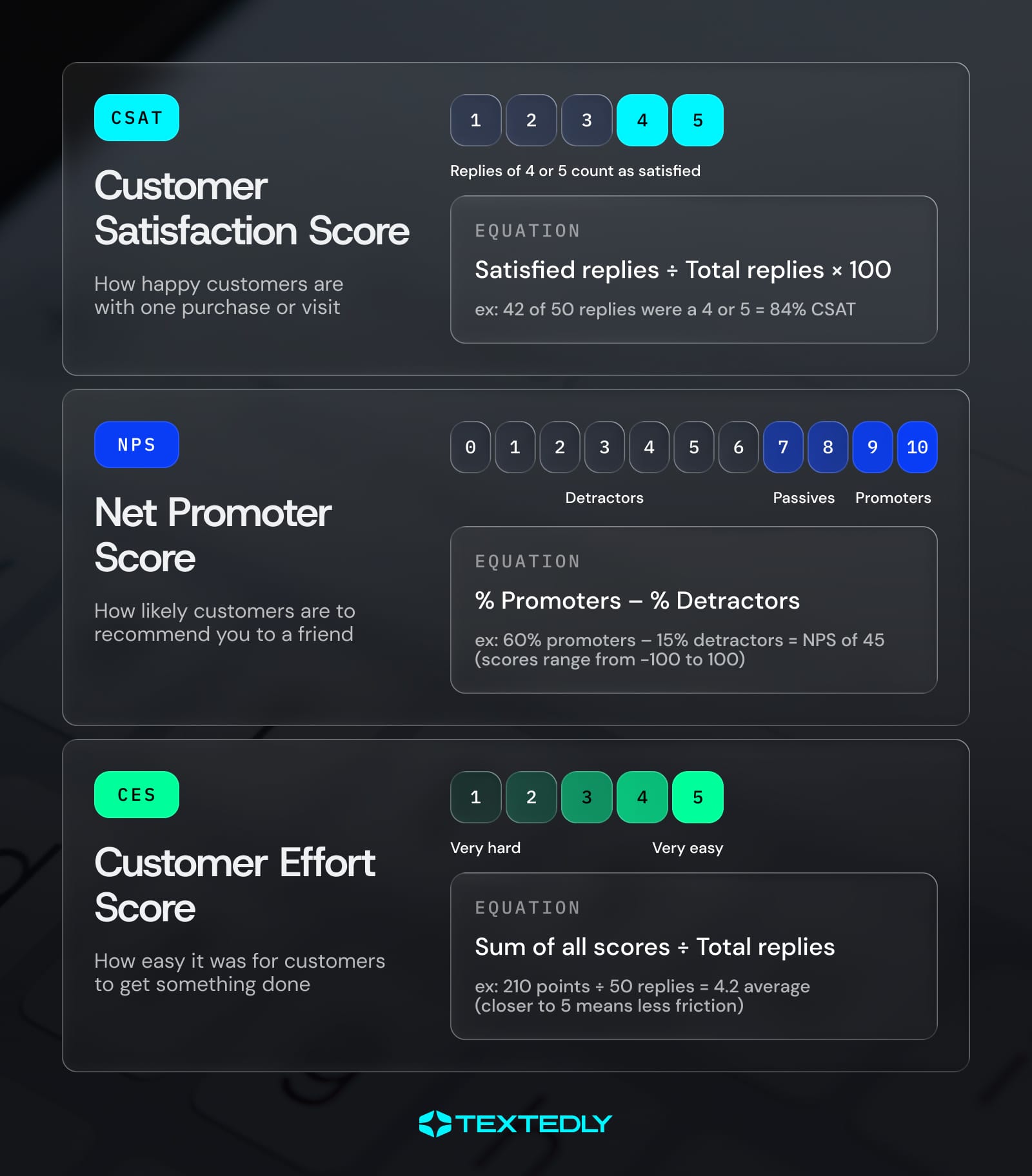
1. Customer Satisfaction (CSAT) Survey Template
A customer satisfaction survey gives you a fast read on how a single purchase or visit went. Send it within a few hours, while the experience is still fresh.
Hi [Name], thanks for choosing [Business]! How satisfied were you with your visit today? Reply 1 (not satisfied) to 5 (very satisfied). Reply STOP to opt out.
2. Net Promoter Score (NPS) Survey Template
Net Promoter Score measures loyalty by asking how likely someone is to recommend you. Pair it with a follow-up text so you learn the reason behind each score.
Hi [Name], how likely are you to recommend [Business] to a friend? Reply with a number from 0 (not likely) to 10 (very likely).
Once they reply, send this follow-up.
Thanks for your score! What’s the main reason you gave it?
3. Post-Purchase Survey Template
Wait a few days after delivery so the customer has time to try what they bought. Letter-based answers make it easy to reply with a single tap.
Thanks for your order, [Name]! How do you like your [product] so far? Reply A if you love it, B if you like it, C if it’s OK or D if you’re not happy.
4. Post-Appointment Survey Template
For service businesses, a yes or no question right after the appointment is the quickest way to catch a problem before it turns into a bad review.
Hi [Name], thanks for coming in today. Did your appointment with [Staff Name] meet your expectations? Reply YES or NO.
5. Product Feedback Survey Template
Product feedback usually takes more than one question, so this template links to a short mobile survey instead of asking for a reply. Mention how long the survey takes so people know what to expect.
Hi [Name], we’re improving [product] and want your input. This 2-minute survey helps us decide what to build next. [link]
6. Customer Effort Score (CES) Survey Template
Customer Effort Score shows how easy it was for someone to get something done, like booking an appointment or getting help from support. Low scores point to friction you can fix.
Hi [Name], how easy was it to [book your appointment / get help today]? Reply 1 (very hard) to 5 (very easy).
7. Lost Customer Feedback Survey Template
When a regular stops showing up, a short and friendly text can tell you why. Give them the choice to reply with a note or take a quick survey, whichever is easier for them.
Hi [Name], we miss you at [Business]! Mind sharing what kept you away? Reply with a quick note, or tap here for a 1-minute survey. [link]
Text Message Survey Templates for Specific Industries
A question that mentions the stylist or the job you just finished feels personal, and personal questions tend to get more useful answers. Swap in details from your own business so each template fits the way you work.
8. Restaurant Survey Text Message Template
Send this within an hour or two of the meal, while guests still remember what they ordered. Asking about a favorite dish gives you menu insight on top of the score.
Thanks for dining with us, [Name]! How was your meal tonight? Reply 1 to 5, and tell us your favorite dish if you’d like.
9. Retail Survey Text Message Template
A same-day text after an in-store purchase helps you spot stock gaps and service issues. If someone replies NO, follow up to ask what they couldn’t find.
Hi [Name], thanks for shopping at [Store]! Did you find everything you were looking for today? Reply YES or NO.
10. Salon and Spa Survey Text Message Template
Give clients a few hours to enjoy their results before you ask. Naming the stylist or therapist makes the survey feel like a personal check-in instead of a mass text.
Hi [Name], we hope you love your new look! How would you rate your service with [Stylist]? Reply 1 to 5.
11. Home Services Survey Text Message Template
Send this as soon as the technician wraps up the job. Inviting customers to flag anything that needs a second look gives you a chance to fix issues before they become complaints. Quick follow-up like this is also one of the easiest home services marketing habits to build, since satisfied customers are the ones who book again and refer their neighbors.
Hi [Name], [Technician] just wrapped up your [service]. How did we do? Reply 1 to 5, and let us know if anything needs a second look.
12. Healthcare Office Survey Text Message Template
Healthcare offices can survey patients about their experience, but keep the questions focused on logistics like check-in and wait times. Under HIPAA, details about a patient’s health count as protected health information, and texting them without the right safeguards can lead to a privacy violation. Following HIPAA-compliant text message practices, like never mentioning a diagnosis or treatment, keeps a simple survey from turning into a compliance problem.
Hi [Name], thanks for visiting [Practice] today. How would you rate your check-in and wait time? Reply 1 to 5.
Text Message Survey Templates for Employees and Events
The same short format works for employees and event attendees. If you already use internal SMS to reach your team, adding a quick pulse survey takes almost no extra work, and a post-event text catches feedback while the details are still fresh.
13. Employee Pulse Survey Template
Send this weekly or monthly to track how your team is doing over time. Only promise anonymity if your survey is set up to keep responses anonymous.
Quick check-in from [Company]! On a scale of 1 to 5, how are you feeling about your workload this week?
14. Event Feedback Survey Template
Send this the day after the event, while attendees still remember the details. The optional link gives people who want to say more a place to do it.
Thanks for joining us at [Event], [Name]! How would you rate the event overall? Reply 1 to 5. Want to share more? Tap here. [link]
15. Quick Poll Template
Polls are the fastest way to get input on a decision, like choosing your next class or menu item. Keep it to four options or fewer so people can answer at a glance.
Help us pick our next [class / menu item]! Reply A for [Option], B for [Option], C for [Option] or D for [Option].
How To Use These Text Message Survey Templates

Before you send, pick the right format. Direct-reply text message surveys work best for one or two quick questions answered with a number or a single word. Link-based surveys send people to a mobile-friendly page, which makes more sense for longer surveys or open-ended questions.
Templates also save time and keep your questions consistent, which makes month-over-month results easier to compare. To send a survey via text, follow these four steps.
- Pick the template that matches your goal.
- Personalize it with the customer’s name and visit details.
- Confirm the recipient has opted in to receive texts from you.
- Trigger it after a purchase or appointment, and set up follow-ups based on each reply.
SMS survey software like Textedly can make that last step easier. You can program SMS surveys to send after specific events and set up message sequences that adapt to each customer’s response. Many businesses also pair surveys with other automated text messages, like appointment reminders, so every survey goes out on schedule without anyone having to remember it.
Best Practices To Increase Survey Response Rates
Small changes in wording and timing can make a noticeable difference in how many people respond. These habits will help more of your survey texts get answered.
Keep It Short
One question per text is ideal. If you need more detail, send a follow-up after they reply or link to a longer survey.
Personalize the Message
Using the customer’s name and mentioning their purchase or appointment shows the text isn’t a mass blast. People are more likely to answer when the message feels written for them.
Send at the Right Time
Send your survey soon after the interaction and during normal waking hours. A survey that shows up days later gets fewer answers, and the ones you do get are less accurate.
Use a Recognizable Sender
Start each survey with your business name so people know who’s texting. Sending from the same number every time helps customers recognize you, too.
Limit Reminders
One reminder is usually enough. Too many follow-ups can push people to opt out, and every opt-out is a customer you can no longer reach by text. Spacing out your messages and keeping each one relevant are two of the simplest ways to lower your SMS unsubscribe rate.
Offer an Incentive
A small discount or an entry into a giveaway can raise response rates, especially for longer link-based surveys.
A/B Test Your Wording
Try two versions of a question with similar groups of customers and compare response rates. Change one thing at a time so you know what made the difference.
How To Analyze and Act on Survey Results
Survey replies are most useful when you treat them as data instead of one-off comments. Start by turning raw replies into scores like CSAT and NPS, then track those scores over time to spot changes, like a dip in satisfaction after a staffing change.
Look for Patterns in Your Replies
Once you have a few weeks of responses, sort them in ways that point to a cause. Compare scores by location, staff member, day of the week or type of service, and read every written reply for repeated words like “wait” or “price.” A complaint that keeps coming up usually points to a process problem rather than one bad day.
Your response rate tells you something too. If it drops, your survey may be going out at the wrong time or reaching the same customers too often.
Turn Insights Into Better SMS Support and Engagement
Each pattern should lead to a change in how you talk to customers. If several people mention long waits, an appointment reminder that sets expectations can head off the next complaint. If pricing questions keep coming up, add that information to your confirmation texts or auto-replies.
Scores also help you decide who gets which message next. Customers who rate you highly are good candidates for loyalty offers and referral asks, while customers who go quiet after a low score may need a personal check-in before any promotion.
Close the Loop With Every Customer
Follow up personally with anyone who leaves a low score. A quick call or text that acknowledges the problem and explains the fix gives you a chance to keep that customer before they post a public complaint. If a complaint does end up online, a calm and specific public answer matters as much as the private one, and these tips on how to reply to negative reviews show how to strike the right tone.
Survey scores shouldn’t decide who gets a review request, though. Asking only happy customers for reviews is called review gating, and Google’s policies don’t allow it. Send the same request to every customer instead, using review request templates that work for any experience.
For example, say a salon notices that Saturday appointments now average a 2 on its post-appointment survey. The written replies keep mentioning wait times, and the owner learns appointments have been running 20 minutes late. She adds buffer time between Saturday bookings and calls each unhappy client with a discount on their next visit. By the following month, Saturday scores are back up.
Text Message Survey Compliance and Privacy
Yes, you need consent before you send text message surveys. In the U.S., the Telephone Consumer Protection Act (TCPA) and carrier rules generally require businesses to get permission before texting customers, and breaking those rules can lead to fines and blocked messages.
A few basics will help keep your SMS surveys compliant:
- Keep records of when and how each person opted in.
- Honor STOP requests right away, and answer HELP requests with your business name and contact information.
- Send during reasonable hours, and don’t text the same person too often.
- Protect response data, especially anything personal or health-related.
Rules also vary by state, and some states set stricter sending hours or consent requirements than federal law, so review the texting laws that apply where your customers live. The FCC’s 2024 rules on revoking consent also require businesses to honor opt-out requests made in any reasonable way, such as replying “cancel” or “unsubscribe,” not only STOP.
Carriers also expect businesses that text from a standard local number to complete 10DLC registration, which verifies your brand and messaging campaigns with The Campaign Registry. Textedly acts as your Campaign Service Provider and works directly with The Campaign Registry on that process. Its compliant SMS web forms also help you collect opt-ins with the right disclosures from the start.
This section is for general information and isn’t legal advice. Talk to a lawyer about the rules that apply to your business.
Start Collecting Feedback With Text Message Surveys Using Textedly
Text message surveys work because they reach customers on the device they already check all day. An SMS survey can go out minutes after a visit and takes seconds to answer, and two-way texting lets you respond to feedback in the same thread.
Textedly’s SMS survey tools are built around those strengths. You can choose between quick polls and links to longer web surveys, then program either one to send after specific events. Replies show up in an insights dashboard, and integrations with tools like HubSpot and Salesforce keep feedback connected to the customer records you already use.
For your business, that means faster feedback with less manual work and more chances to fix a problem before it becomes a bad review or a lost customer.
Create your free account and send your first SMS survey today using any of the 15 templates above.
Frequently Asked Questions
How Do I Write a Survey Text Message?
To write a survey text message, start with your business name so people know who’s texting, then ask one clear question with simple reply instructions, like “Reply 1 to 5.” Keep the message under 160 characters when you can, so it arrives as a single text.
How Many Questions Should a Text Survey Have?
A text survey should have one or two questions when customers reply directly by text. If you need more than that, send a link to a short mobile survey and tell people how long it will take.
What is a Good Response Rate for Text Surveys?
A good response rate for a text survey is one that matches or beats the average, which SurveyMonkey’s 2025 platform data puts at 18.54% for SMS surveys. Your own rate will shift with your audience and timing, so compare each survey against your past results too.
What’s the Difference Between a Text Survey and a Text Poll?
A text survey collects feedback about an experience, often with a rating scale and follow-up questions. A text poll asks people to vote on a single choice, like a date for an event or a new menu item.
Can I Send a Survey Without Opt-in?
Generally, no. Businesses should get consent before texting customers, including for surveys, and every message should make it easy to opt out. Review the texting laws that apply to your business before you send.
Related resources:
Related Articles

How to Use B2B Texting to Boost Sales and Communication

7 MMS Campaign Best Practices to Nail Your Message

10 Common SMS Marketing Campaign Mistakes To Avoid

The 5 Best EZ Texting Alternatives in 2027


Your Customers Are Waiting
Send your first text in minutes—no contracts, no credit card, no hassle.